
Introduction
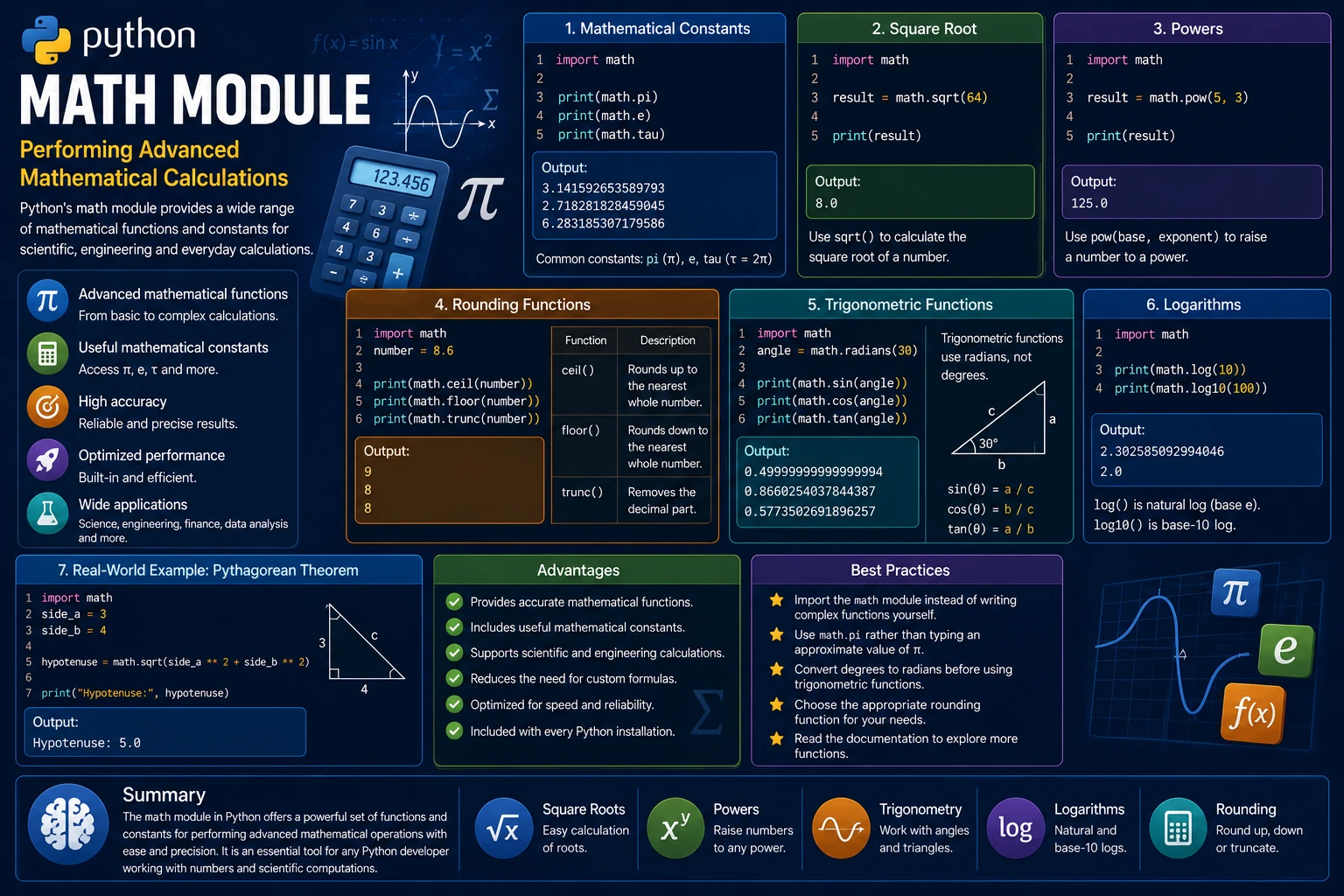
Python provides a built-in math module that contains many useful mathematical functions and constants. It allows you to perform calculations that go beyond basic arithmetic, including square roots, powers, trigonometric functions, logarithms and rounding.
The math module is widely used in scientific computing, engineering, finance, game development, data analysis and many other applications that require accurate mathematical calculations.
Why Use the Math Module?
Instead of writing complex mathematical formulas yourself, the math module provides reliable, optimized functions that are easy to use.
- Perform advanced mathematical calculations.
- Access useful mathematical constants.
- Improve calculation accuracy.
- Reduce the amount of custom code.
- Used in scientific and engineering applications.
Importing the Math Module
Before using its functions, import the math module.
import math
You can now access all mathematical functions using the math. prefix.
Mathematical Constants
The math module provides several useful constants.
import math

print(math.pi)
print(math.e)
print(math.tau)
Output:
3.141592653589793
2.718281828459045
6.283185307179586
Calculating Square Roots
The sqrt() function calculates the square root of a number.
import math

result = math.sqrt(64)

print(result)
Output:
8.0
Calculating Powers
The pow() function raises a number to a specified power.
import math

result = math.pow(5, 3)

print(result)
Output:
125.0
Rounding Functions
The math module provides several functions for rounding numbers in different ways.
import math

number = 8.6

print(math.ceil(number))
print(math.floor(number))
print(math.trunc(number))
Output:
9
8
8
Here is what each function does:
| Function | Description |
|---|---|
ceil() |
Rounds up to the nearest whole number. |
floor() |
Rounds down to the nearest whole number. |
trunc() |
Removes the decimal part. |
Trigonometric Functions
The math module includes trigonometric functions such as sine, cosine and tangent. Angles must be provided in radians.
import math

angle = math.radians(30)

print(math.sin(angle))
print(math.cos(angle))
print(math.tan(angle))
Output:
0.49999999999999994
0.8660254037844387
0.5773502691896257
Logarithms
The log() function calculates the natural logarithm of a number, while log10() calculates the base-10 logarithm.
import math

print(math.log(10))
print(math.log10(100))
Output:
2.302585092994046
2.0
Real-World Example
The math module is frequently used in engineering, finance and scientific applications. In the example below, the Pythagorean theorem is used to calculate the length of the hypotenuse of a right triangle.
import math

side_a = 3
side_b = 4

hypotenuse = math.sqrt(side_a ** 2 + side_b ** 2)

print("Hypotenuse:", hypotenuse)
Output:
Hypotenuse: 5.0
Advantages of the Math Module
- Provides accurate mathematical functions.
- Includes useful mathematical constants.
- Supports scientific and engineering calculations.
- Reduces the need to write custom formulas.
- Optimized for speed and reliability.
- Included with every Python installation.
Best Practices
- Import the
mathmodule instead of writing complex mathematical functions yourself. - Use
math.pirather than typing an approximate value of π. - Convert degrees to radians before using trigonometric functions.
- Choose the appropriate rounding function for your application.
- Read the official documentation to discover additional mathematical functions.
Summary
Python's math module provides a rich collection of mathematical functions and constants for solving everything from simple calculations to complex scientific problems. Whether you need square roots, powers, logarithms, trigonometric functions or precise rounding, the math module offers reliable and efficient tools that make mathematical programming easier. Mastering this module is valuable for anyone working in science, engineering, finance, data analysis or game development.
Examples
The following examples help reinforce the concepts explained in this lesson.
<!DOCTYPE html>
<html>

<head>

<title>My First Page</title>

</head>

<body>

<h1>Hello World</h1>

</body>

</html>
💡 Pro Tip
Practice every concept immediately after reading it. Learning by doing is the fastest way to master HTML.
⚠ Common Mistake
Do not simply copy code examples. Type them yourself and experiment with small changes.
Best Practices
- Write clean and readable HTML.
- Indent your code consistently.
- Use semantic HTML elements.
- Validate your HTML regularly.
- Test your pages in multiple browsers.
Frequently Asked Questions
Why should I learn HTML first?
HTML is the foundation of every website. Once you understand HTML, learning CSS and JavaScript becomes much easier.
Is HTML difficult?
No. HTML is considered one of the easiest web technologies to learn, making it an excellent starting point for beginners.